
 DMCA
DMCA
 FAQ
FAQ
 Webapp Installation
Point of Sale Systems: A Guide to Choosing the Best Option
Point of Sale Systems: A Guide to Choosing the Best Option
Efficient transaction processing is important for any business, big or small, whether a small store or a big restaurant. This is where point-of-sale systems (POS) come into play. A POS system does more than just process payments. It also helps with keeping track of customers, managing stock, looking at sales data, and other things. In this tutorial, we'll go over the basics of point of sale systems, the several types that are available, their advantages and cons, and how to choose the best one for your business.
What is a Point of Sale Systems?
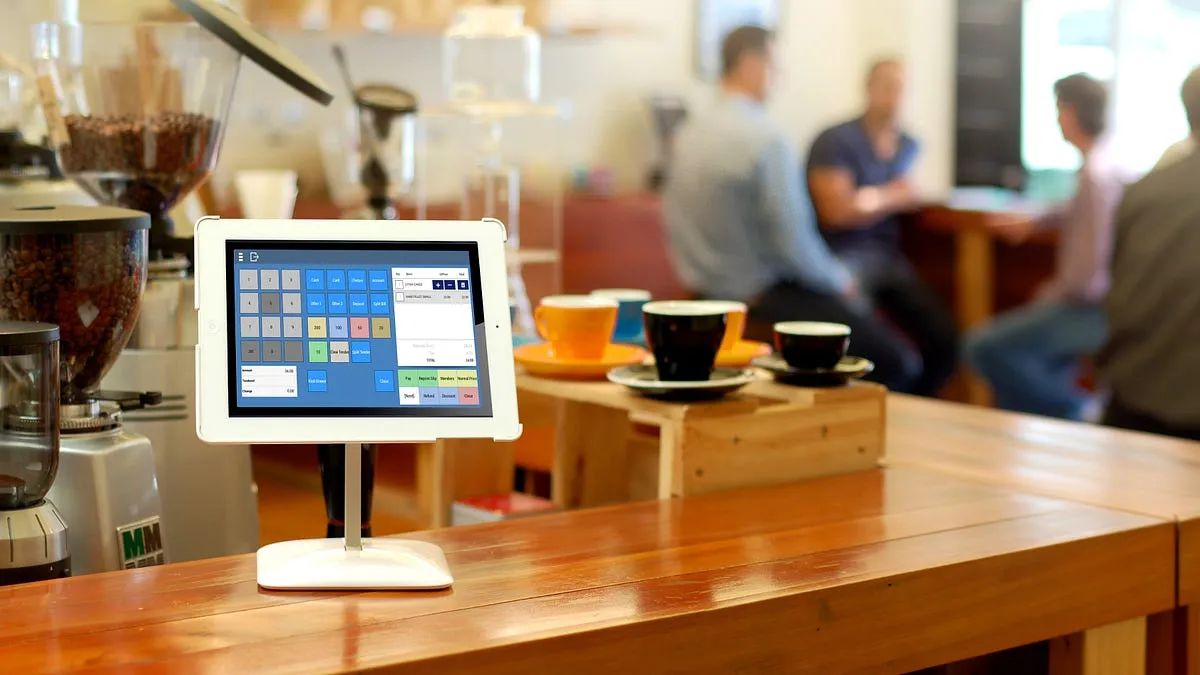
A point of sale (POS) system is a combination of hardware and software that businesses use to complete sales transactions. The hardware usually includes a register, a barcode scanner, a receipt printer, and a payment terminal. The software is meant to keep track of sales data, inventory, and other administrative functions.
Businesses use point-of-sale (POS) systems to keep track of their stock, process payments, and create important reports. They have developed from simple cash registers to complicated systems that tell businesses how they are doing in real time.
How Does a POS System Work?
At its core, a POS system allows businesses to:
-
Process sales transactions: Whether through cash, card payments, or mobile wallets, POS systems ensure that payments are processed quickly and securely.
Please keep track of your inventory: The POS system automatically changes inventory levels when things are sold, which helps firms prevent running out of stock or having too much of it.
Make reports: POS systems give business owners up-to-date sales data, which helps them plan for the future, make decisions, and keep track of their money.
Manage customer data: A lot of POS systems work with customer relationship management (CRM) solutions to keep track of things like client preferences, purchase history, and loyalty programs.
Different kinds of point-of-sale systems
There are many kinds of POS systems, and each one is made to work best for a certain sort of business. The ideal option for your business will depend on what you do, how much money you have, and what features you need.
1. Traditional POS Systems
Businesses typically use traditional POS systems with a physical storefront, such as retail shops, grocery stores, and restaurants. These systems usually involve hardware components like a cash register, card reader, receipt printer, and barcode scanner. The software is installed locally on business hardware, making it ideal for businesses with a stable location and reliable internet access.
Features:
-
Robust and reliable
-
Large inventory management capabilities
-
Requires more upfront investment
2. Cloud-Based POS Systems
Cloud-based POS systems store data on remote servers, which can be accessed via the internet. These systems are popular among businesses that require flexibility, like those with multiple locations or those that want access to their data from anywhere. Cloud POS systems typically have lower upfront costs but require a subscription fee.
Features:
-
Real-time data access from any device
-
Automatic updates and backups
-
Ideal for businesses with multiple locations
3. Mobile POS (mPOS) Systems
Mobile POS systems are designed for businesses on the go. These systems use smartphones or tablets as the main device for processing transactions, with additional accessories like card readers and receipt printers. Mobile POS is great for small businesses, pop-up shops, food trucks, and service providers who need portability and ease of use.
Features:
-
Portable and easy to set up
-
Affordable for small businesses
-
Integration with mobile payment options (e.g., Apple Pay, Google Pay)
4. Self-Service Kiosk POS Systems
Self-service kiosks are increasingly popular in industries like fast food, retail, and airports. These systems allow customers to place orders, make payments, and even print receipts without the need for a cashier. Self-service kiosks can improve efficiency and reduce labor costs.
Features:
-
Customer-driven transactions
-
Ideal for high-traffic areas or quick-service businesses
-
Reduces the need for manual interaction
Related more articles, pos ireland
Key Features to Look for in a POS System
When choosing a point of sale system, there are several important features to consider. Depending on your business needs, some features may be more relevant than others.
1. Payment Processing Capabilities
A good POS system should support multiple forms of payment, including credit/debit cards, mobile wallets, and even cash. The system should also integrate with payment processors that offer secure and fast transactions, reducing the risk of errors or fraud.
2. Inventory Management
Effective inventory management is crucial for businesses that sell physical products. Look for a POS system that automatically updates inventory as sales are made. Real-time inventory tracking will help you avoid stockouts and overstocking, which can lead to lost sales or unnecessary storage costs.
3. Customer Relationship Management (CRM)
A POS system that integrates with CRM tools allows you to track customer preferences, purchase history, and contact information. This helps in personalizing marketing efforts, offering loyalty rewards, and improving customer retention.
4. Reporting and Analytics
Reporting features are essential for understanding your business performance. Look for a POS system that provides real-time data on sales, inventory, and employee performance. These insights can guide business decisions and help you identify trends and areas for improvement.
5. User-Friendly Interface
The usability of a POS system is crucial for ensuring smooth operations. The system should have an intuitive interface that is easy to navigate, even for employees who are not tech-savvy. Training time should be minimal, and the system should streamline daily tasks.
Benefits of Using a POS System
The benefits of using a point of sale system extend beyond just processing sales. Here are some of the key advantages:
1. Improved Efficiency
POS systems automate many tasks, such as inventory tracking and sales reporting, which saves time and reduces human error. This allows your staff to focus on more critical aspects of customer service and sales.
2. Better Customer Service
With the ability to track customer preferences and purchase history, POS systems help businesses offer personalized service. This enhances the customer experience and can lead to increased customer satisfaction and loyalty.
3. Real-Time Data and Insights
Having access to real-time sales and inventory data allows you to make informed business decisions. Whether you're deciding which products to restock or identifying top-performing sales staff, real-time data is essential for running a successful business.
4. Seamless Integration
POS systems often integrate with other business tools, such as accounting software, CRM systems, and e-commerce platforms. This streamlines operations and ensures that your data is consistent across all systems.
Choosing the Right Point of Sale System
Investing in the right point of sale system is crucial for the success of your business. Whether you're running a small boutique or a large restaurant, the right POS system can streamline operations, improve customer service, and provide valuable insights into your business. Take the time to assess your needs, compare different systems, and choose the one that best fits your business size, budget, and goals.
With the wide variety of POS systems available, you're sure to find one that can help your business grow and succeed in today's competitive market.