Teach live
Showcase your expertise, publish educational posts, share materials and use Cikamo Live for classes and webinars for students anywhere.
Cikamo is more than an exam platform. It is a digital campus for tutors, teachers, lecturers, trainers and creators to build a teaching presence, share knowledge, connect with learners, assess understanding and recognise achievement.
Free trial available for eligible exam creators. No payment needed to start.
 Click to enlarge
A tutor may teach a WhatsApp class with dozens or hundreds of learners. After weeks of teaching, they still need to create questions, set a time limit, share an exam, mark written answers, track results and recognise achievement. Doing every step by hand takes time.
Cikamo brings the key parts of that journey together: prepare an exam, run it online, grade supported objective questions automatically, mark written responses, review results and design custom certificates. Around those tools you can build a profile, be discovered, teach live and connect with your learners.
Cikamo is not only for exams. It is a social platform for learners and the people who teach them, with profiles, posts, followers, groups, chat, live sessions, study resources and ways to earn from your knowledge.
Help people discover you, share knowledge, understand what learners have mastered and recognise their progress.
Showcase your expertise, publish educational posts, share materials and use Cikamo Live for classes and webinars for students anywhere.
Create exams with flexible question types, AI-assisted drafts, reusable question banks, timed attempts and automatic grading.
Review performance, export reports and issue certificates with your own name, logo and branding.
Create a tutor profile students can find, be discoverable in Tutor Hub and connect with learners based on what you teach.
Follow and message learners and creators, join groups and build a community around your subject.
Explore paid exams, subscriptions, paid posts, hourly paid live access and marketplace opportunities, depending on your plan.
From preparing an exam to verifying a certificate, here are the real Cikamo screens behind each step. Click any screenshot to enlarge it.
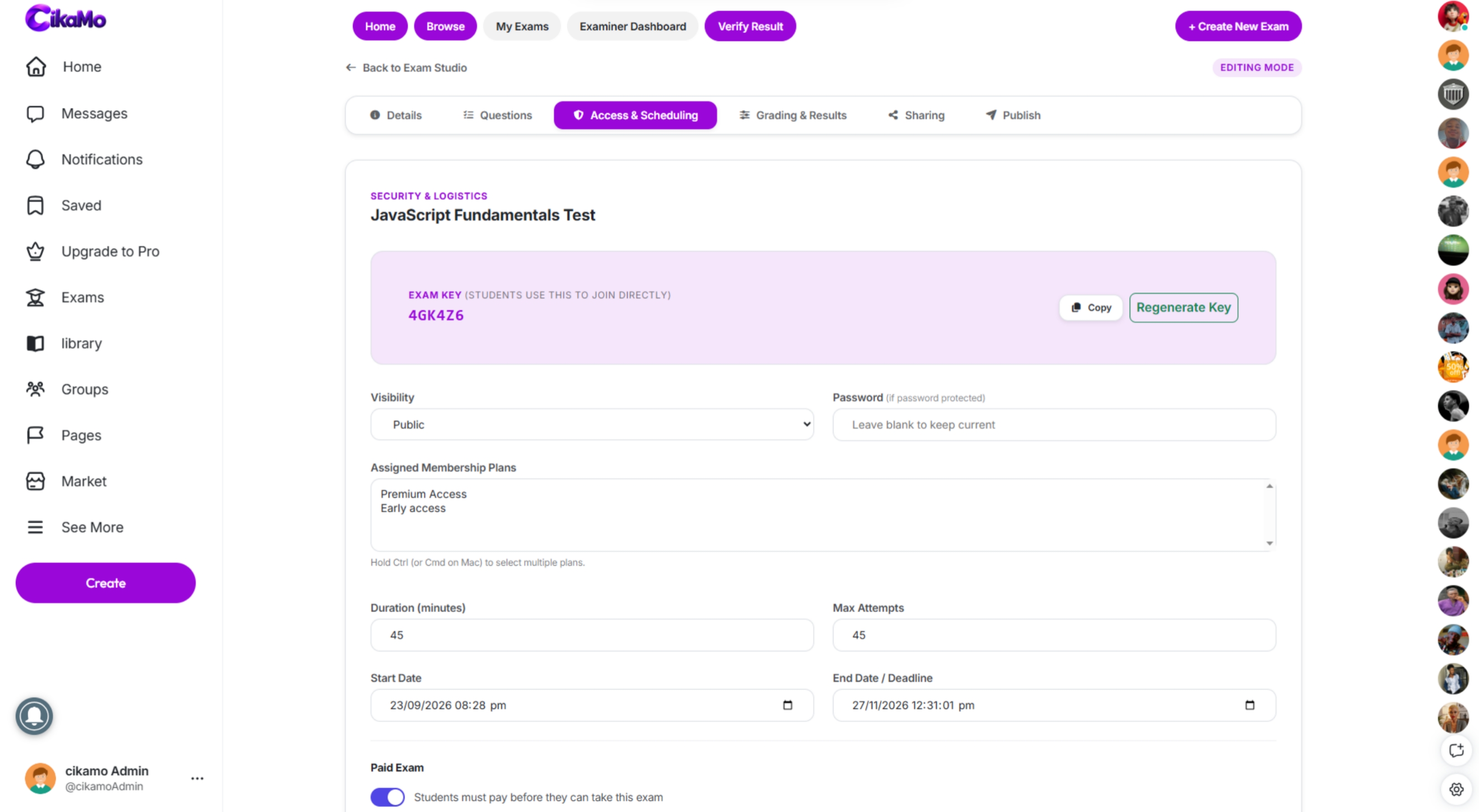
Set up the assessment, add your questions and configure the details before you share it. Use six question types, import questions in bulk, reuse your question bank or let AI draft questions from your notes. You review and edit everything before it reaches a learner.
 Click to enlarge
Learners see your instructions, timing and exam rules before they begin. They can read the instructions first, and sign in or create an account only when they are ready to take the exam.
 Click to enlarge
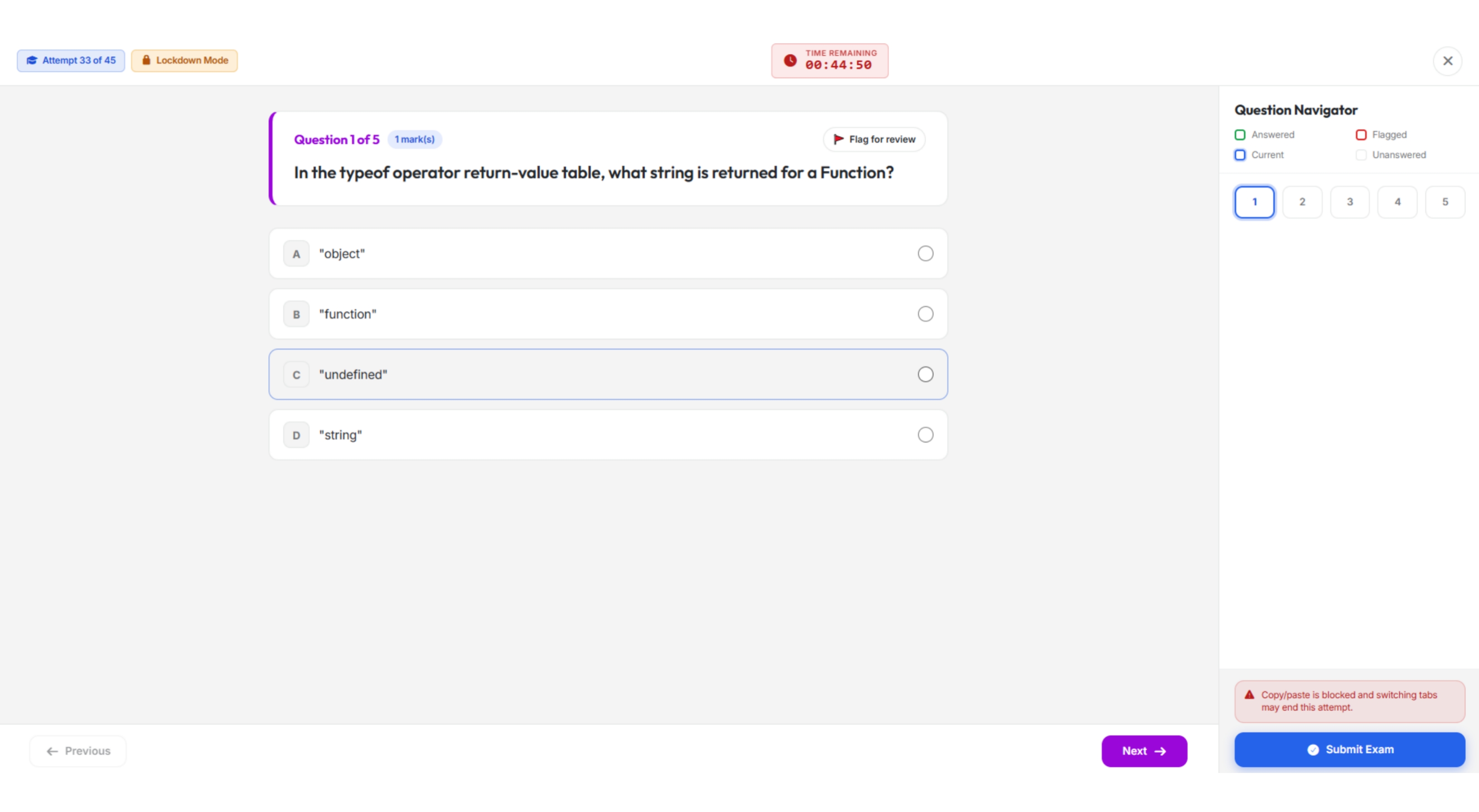
Learners answer inside a focused exam screen with a countdown timer and a question navigator. It works on phones and computers, so tests and remote practice are easy to run.
 Click to enlarge
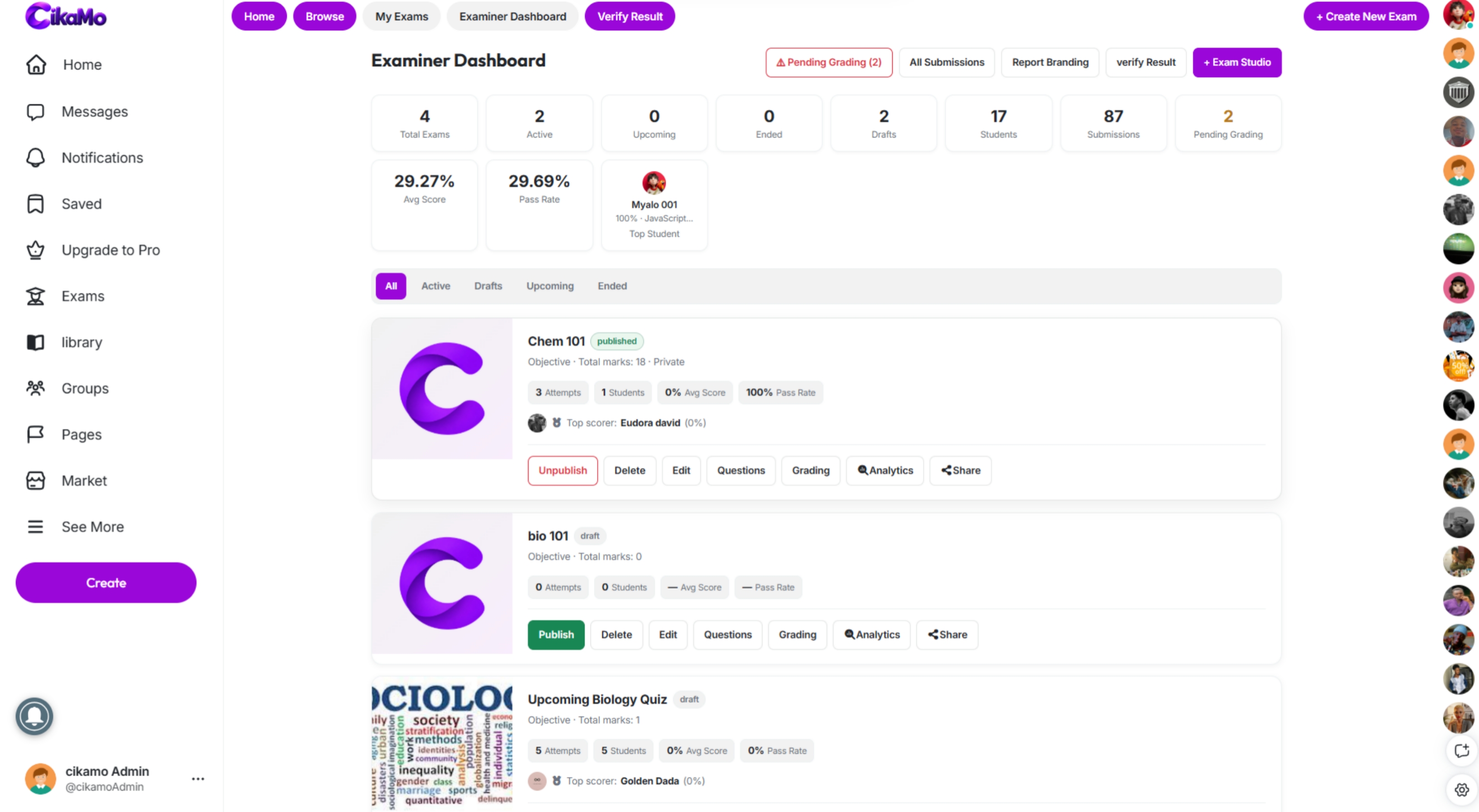
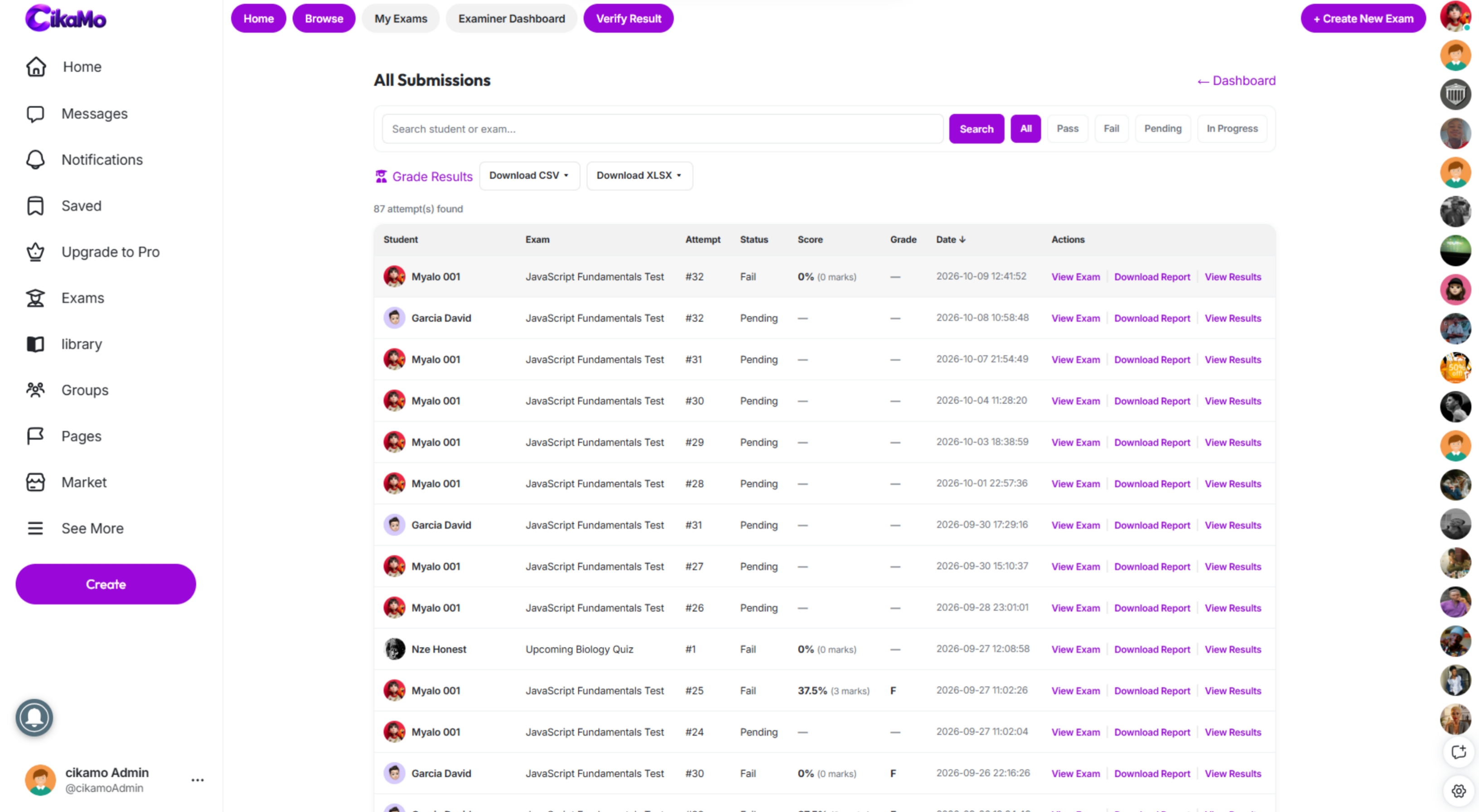
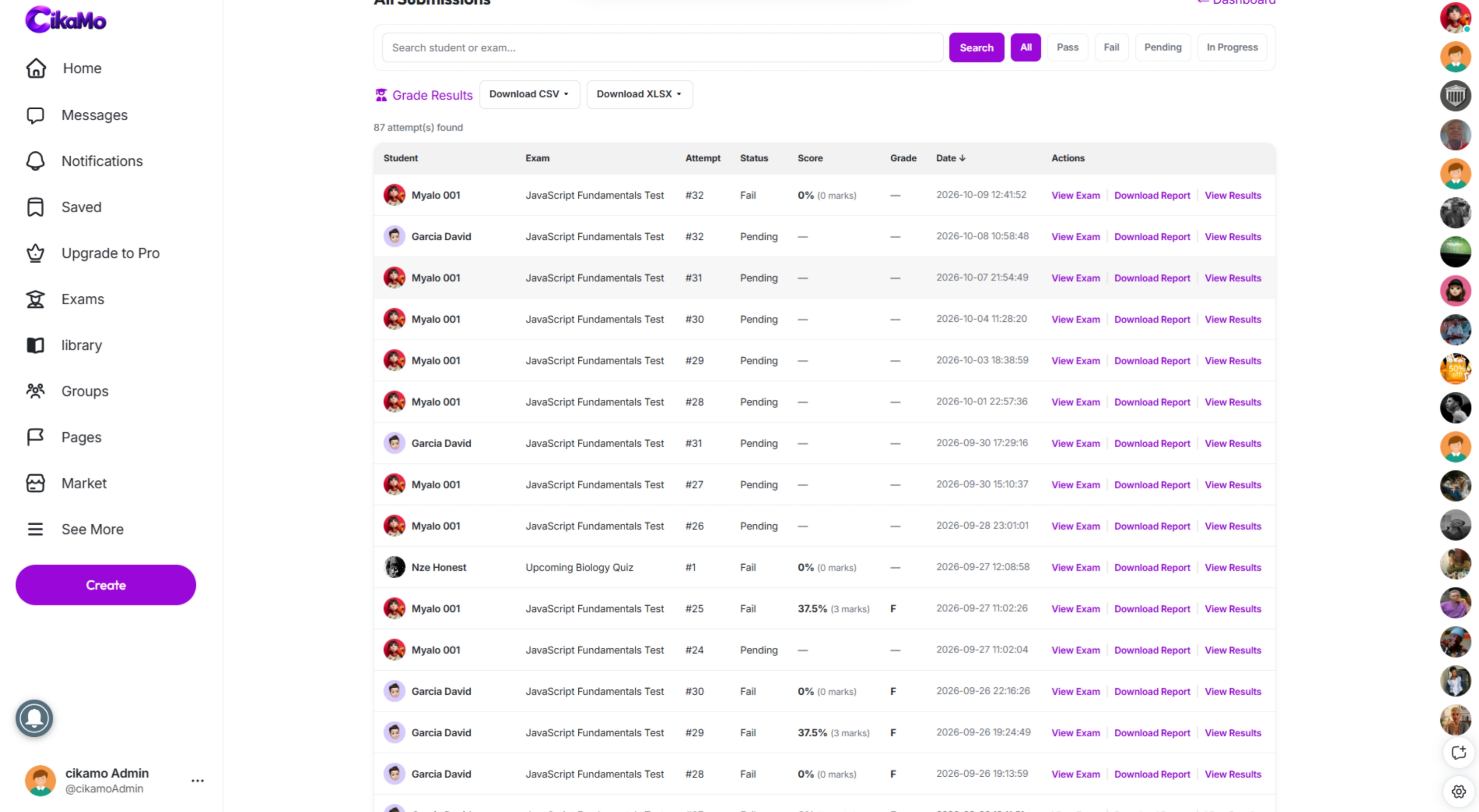
See who has submitted, who is still in progress and who passed or failed. Search, sort and filter the list so nothing slips through while you work.
 Click to enlarge
Open an individual attempt to see the work that was submitted and follow up with confidence. The review flow keeps your whole assessment workflow in one place.
 Click to enlarge
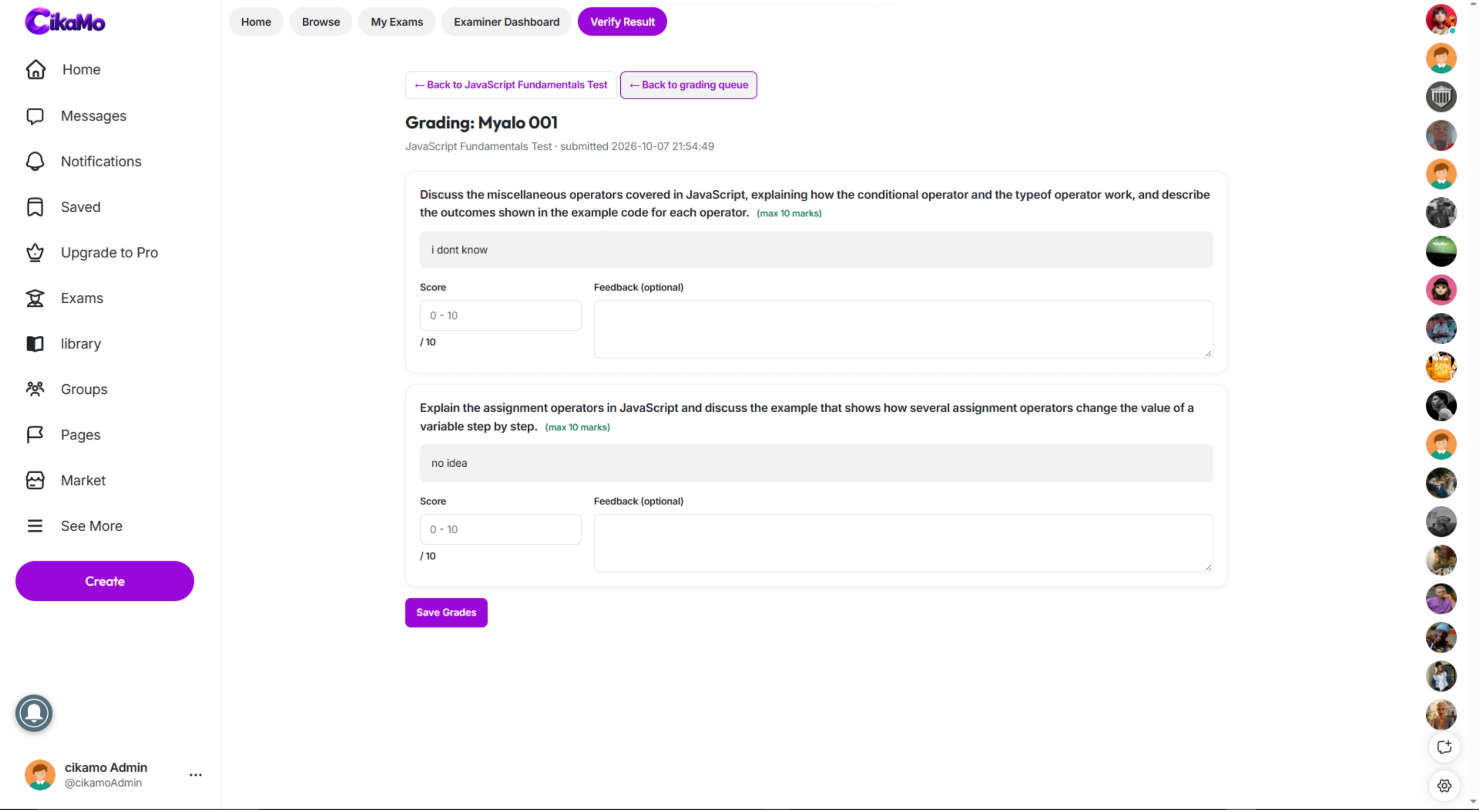
Objective questions are graded automatically. Essays and other written responses go to the examiner for marking, so human judgement stays where it matters and the rest saves you time.
 Click to enlarge
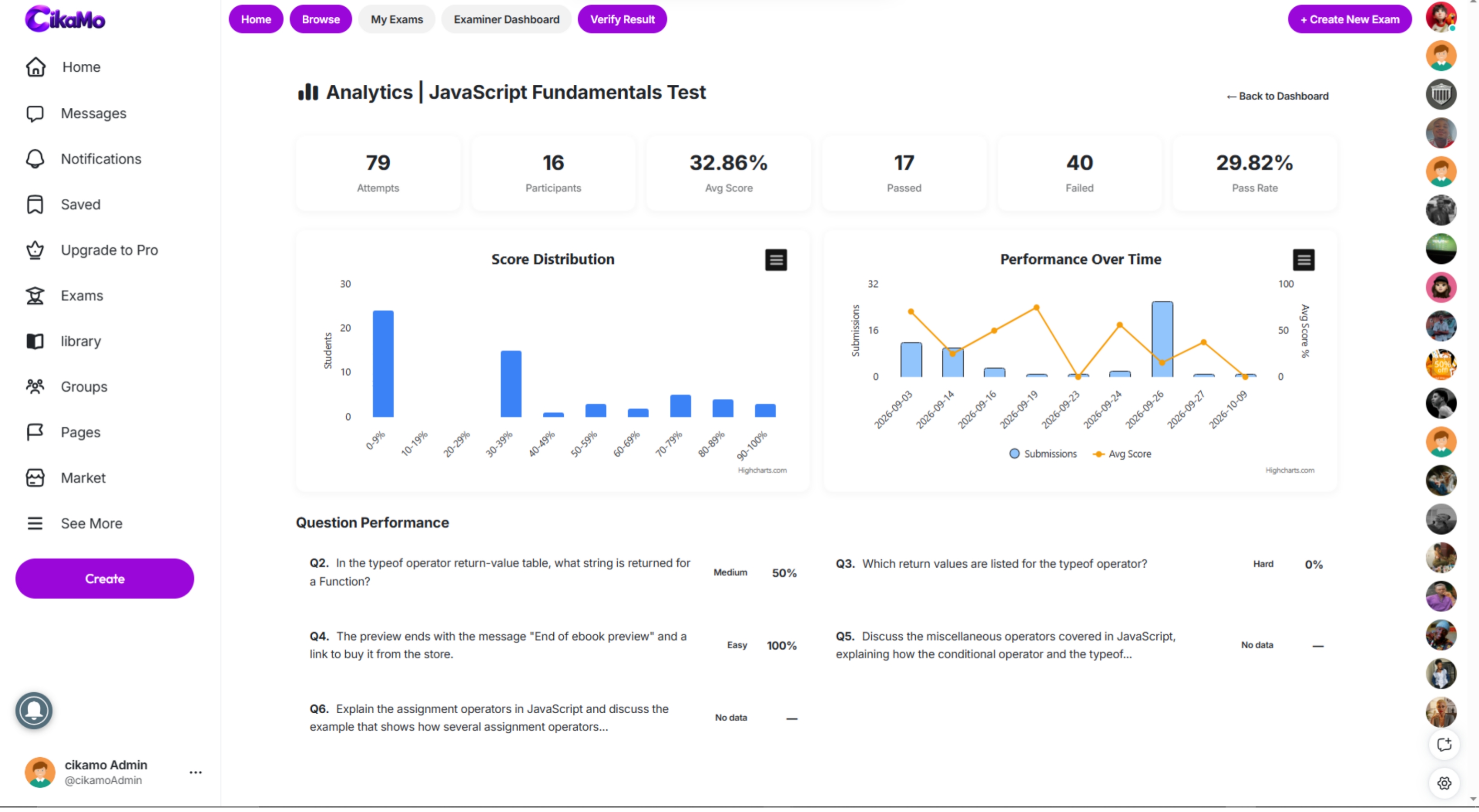
Your examiner dashboard shows attempts, scores and performance at a glance, with a badge for work still waiting to be marked. Publish or unpublish an exam whenever you need to.
Click to enlarge
Question-level analytics show how learners performed and which questions were difficult. Use that to decide what to explain again in your next lesson.
 Click to enlarge
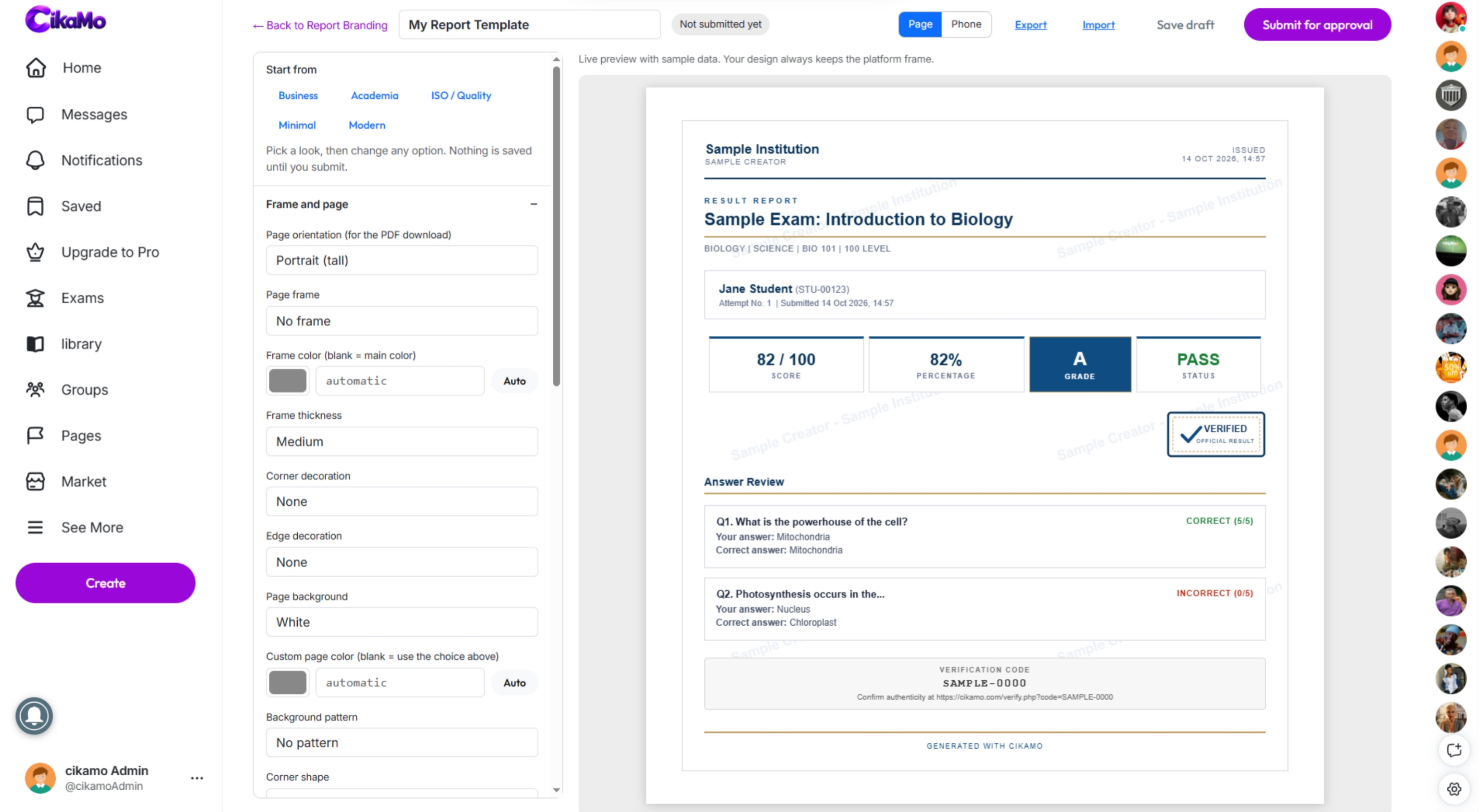
Prepare achievement certificates carrying your name, logo and branding to recognise learners after an assessment, and export results as PDF, Excel or CSV reports.
 Click to enlarge
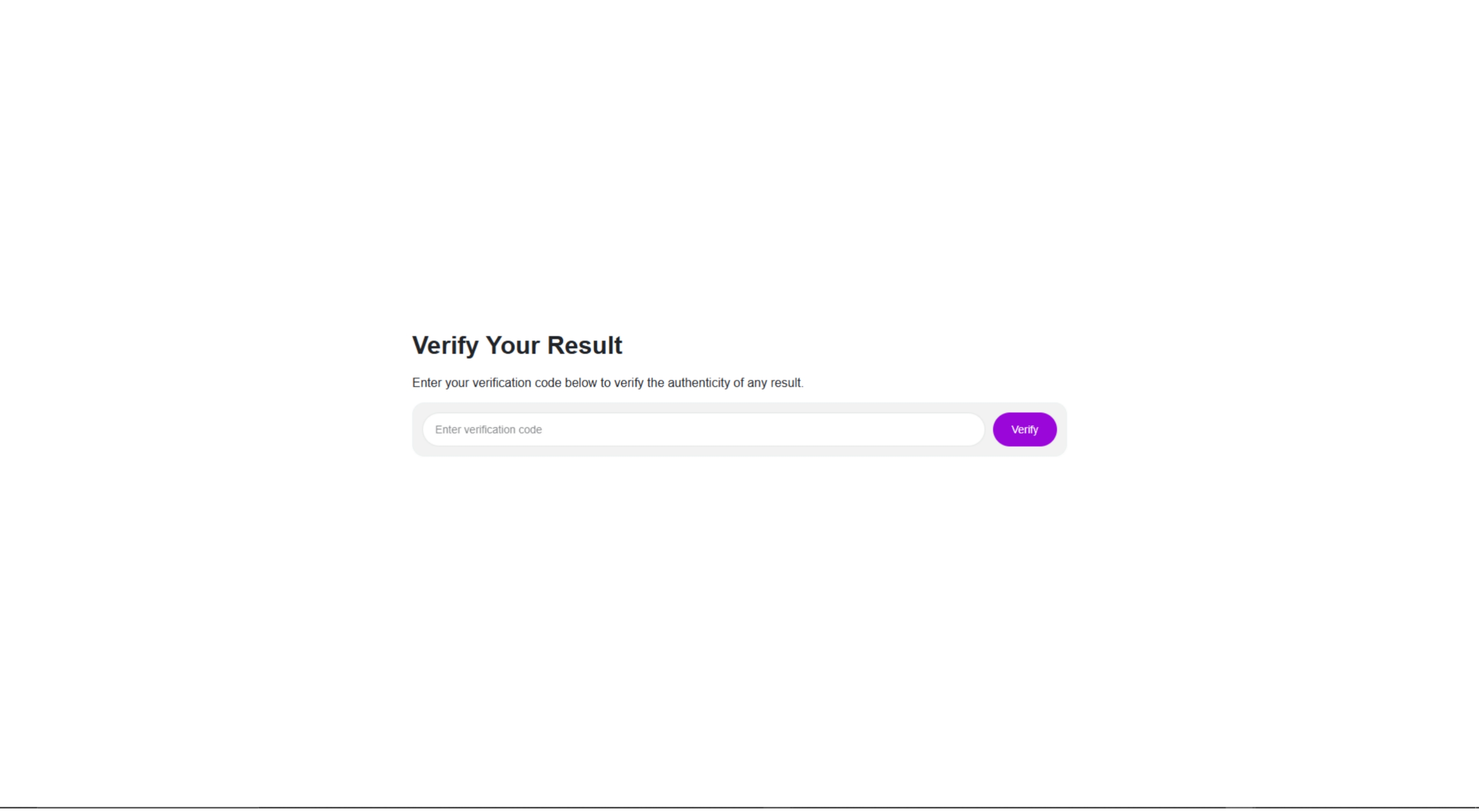
The verification screen lets recipients and issuers check a result or certificate against the record held in Cikamo, so achievements can be trusted.
 Click to enlarge
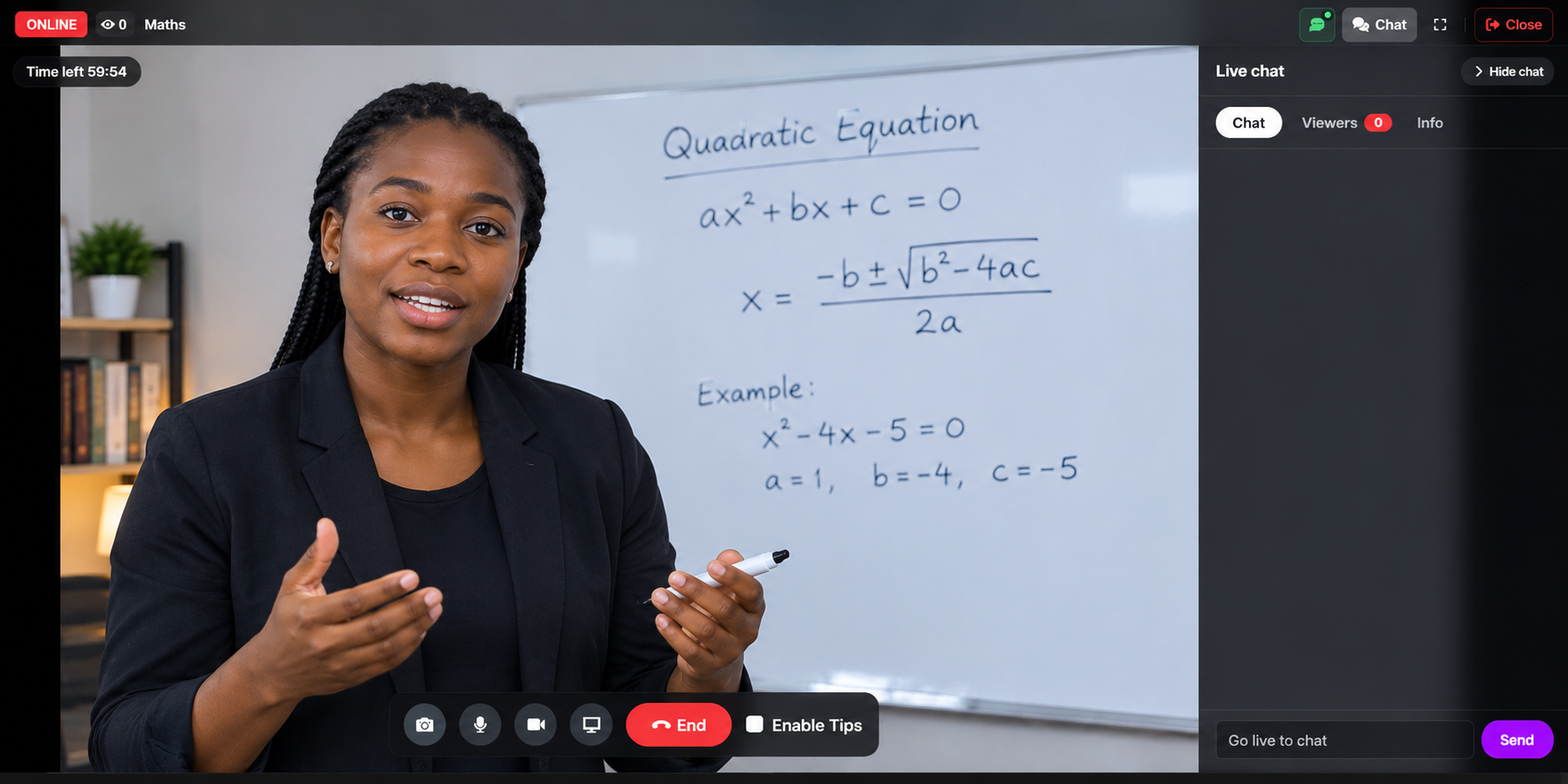
Teach students from anywhere, whether you are preparing candidates for JAMB or running other tutorials. Host live classes and webinars and offer access to paying students.
 Click to enlarge
Tutor Hub helps learners discover tutors on Cikamo and gives educators a place to showcase their expertise and reach prospective students.
Filter tutors by what you need to learn and how you want to learn it.
Pick a date and time for a lesson, or describe a task and your deadline.
Meet online or in person, join a group lesson or a live class.
Rate your tutor and keep up with your tutor’s notes on your progress.
Cikamo is for the people who create knowledge and guide learners. Students are important users, but this invitation is for the people who teach.
Tutorial masters teaching large groups who need a better way to test and follow up.
Online teachers, lecturers and private tutors who set assessments and want to reach more learners.
Skills instructors and trainers who run programmes, teach live and certify completion.
Educational creators with a growing audience who want a community and paid content options.
Bible-study and religious instructors who teach groups and share learning materials.
Professionals and subject specialists who want to share what they know and be found.
Use the wider platform to build relationships, share resources and explore ways to earn, depending on the features and plan available to you.
A free discovery area for study materials. Browse by institution, programme, course and material type, and share notes and revision materials.
Follow and be followed, post updates, files and insights, and message learners. Free public posts help people discover you.
Use groups, pages, forums and events to gather a class or a community around a subject or learning goal.
List products or services for the audience you build.
A discovery area for courses and learning programmes.
Opportunity areas beyond the classroom.
More ways to be recognised and rewarded.
Public exams also appear in exam discovery and on your profile’s Exams tab.
Build a free audience first, then offer paid options when you are ready. Which options you can use depends on the features and package available to you.
Offer an exam as a paid assessment so learners pay before they take it.
Let followers subscribe for access to your subscriber-only content and exams.
Charge for an individual post instead of asking a follower to subscribe.
Host a livestream and charge viewers by the hour for access.
Sell products or services to the audience you build through teaching.
If you already collect payment directly for live classes, arrange their access without asking them to pay again on the platform.
Your teaching can be ongoing, not just a single lesson or test.
Sign up and join the Cikamo community.
Share your expertise, resources and content with the people who want to learn from you.
Create an exam, choose the access settings and share it with a link or exam key, or go live to teach in real time.
Review results, use reports to understand performance and award branded certificates where appropriate.
Choose from Trial, Basic, Tutor, Tutor Pro, Influencer and Entrepreneur. Packages differ in the number of exams, students and daily AI-generated questions you can use. New creators can start with the free trial.
Teach through content and live streams, share resources, connect with learners, assess progress, recognise achievement and explore ways to earn from your expertise. New creators can start a free trial, with no payment needed.
Yes. New creators can start a free trial from the plans page, with no payment needed. Each account can use it once. When it ends, choose a plan to keep creating exams. Your exams are kept.
No. Exams are one tool in a wider digital campus: live teaching, Tutor Hub, a social community, the Library, certificates and ways to earn.
Tutor Hub helps learners discover tutors on Cikamo. Learners search for tutors and explore profiles, while tutors can list themselves and become discoverable.
Tutors can list themselves in Tutor Hub so learners searching for tutors can discover their profile. Set up your profile and expertise first, so there is something for learners to explore.
Tutors, lecturers and trainers can create exams when their plan includes exam creation, including the free trial. Compare plans on the plans page.
Students can read the exam instructions first. To take an exam, they sign in or create an account.
Share the exam link or its exam key. Public exams can also be found in exam discovery and on the Exams tab of your profile.
Objective questions are graded automatically. Examiners mark essays and written answers, and students see results once they are published.
Yes. AI drafts questions, answers and explanations from your material. You review and edit them before using them with learners.
Yes. You can import questions in bulk and keep a reusable question bank organised by subject or topic.
Yes. Depending on your setup, exams can be public, private, password-protected, paid or available only to your subscribers.
When enabled, the exam can end an attempt if a student leaves the exam page, switches tabs or tries to exit. Explain this clearly to students before they begin.
Yes. The exam screen is built to work on both phones and computers.
Yes. Hosts can charge viewers by the hour for livestream access, where paid access is enabled. If you already collect payment directly, you can arrange your students’ access without asking them to pay again on the platform.
Yes. Exams can be free, paid or available only to your subscribers, depending on your configuration and plan.
Yes. Report formats include PDF, Excel and CSV, with support for custom report templates.
Yes. You can create certificates with your own name, logo and branding, and recipients can verify them on the verification screen. They are issued by you and are not external accreditation.
Yes. The Library is a free discovery area for study documents, and you can also share files and updates through your posts and groups.
Through your tutor profile and Tutor Hub, public exams in exam discovery and on your Exams tab, and your posts and community.
No. Earnings depend on what you offer and what people choose to buy or subscribe to. Cikamo does not pay users simply for posting or receiving views.
The number of exams, students and daily AI-generated questions you can use depends on your plan. Visit the plans page for details.
Teach. Assess. Connect. Certify. Grow with Cikamo.